Building a Markdown Blog with an AI Agent on my old Vue2 Stack.
Preramble: I recently wanted to start noting down some of my projections and learners from said projects, but would also like to share. My current website is a Vue2 project that I built almost 7 years ago? I cant remember, but vue2 was very much in at the time. The website although it's very simple now used to be part of a k8s project where I built a micro-serviced based application for learning purposes, that I eventually stripped down to only a client-side frontend.
Contents
- Building a Markdown Blog with an AI Agent on my old Vue2 Stack.
- Constraints: Working With What I Had
- Enter Zed: Coding With an AI Agent
- Choosing the Right Model: Claude vs OpenAI
- OpenAI (GPT-4-turbo)
- Claude (Anthropic, Claude 3 family)
- My Workflow: Code, Test, Ask, Iterate
- Step 1: Bootstrap With What I Knew
- Step 2: Ask the Agent to Improve It
- The Real Value: Time Saved and Sanity Preserved
- What Worked Well
- What Could Be Better
- Final Thoughts
- Tips for Others Doing This
- Conclusion
Constraints: Working With What I Had
I built my personal website years ago using Vue2, and while it's served me well, it’s no secret amongst my peers that it’s an over-engineered and antiquated tech stack. When I decided I wanted to add a blog to it, I had a few strict constraints:
- No full rewrite – I didn’t have time or energy to migrate the whole projection to Vue3 or another framework.
- No hosted blog platforms – I didn’t want to integrate a hosted CMS or static site generator like Ghost or Netlify CMS.
- Low cost – Both in terms of time and money. This ruled out anything requiring subscriptions or heavy infrastructure changes.
- Simple content workflow – I wanted to write in Markdown and have it render cleanly within my site. No frills.
- ShadCDN - Recently a friend has been pitching this new component library to me, and it looks amazing - I did want to include this but this would mean spending the time learning how to use it, and I didn't have the time to do that.
Given these constraints, the path became clear: keep the stack, render Markdown files directly, and find a way to generate the code with minimal fuss.
Enter Zed: Coding With an AI Agent
Zed is a fast, minimalist code editor built for pair programming—with AI agents (and other engineers) in the mix. I had heard of Zed’s built-in AI tooling and figured this was the perfect opportunity to test it in a real-world setting.
So what is an AI Agent, exactly In essence, AI agents are collaborative assistants embedded into your development environment. They're powered by large language models (LLMs), like those from OpenAI or open-source alternatives like Claude (from Anthropic), and they work alongside you to write, improve, and explain code. Unlike traditional autocomplete or copilot-style assistants, agents in Zed work more contextually. You chat with them like a teammate. You give them a task—say, “convert this vanilla JavaScript markdown renderer to support syntax highlighting”—and they take a stab at it. Often, it’s good enough to use directly or refine in a couple iterations.
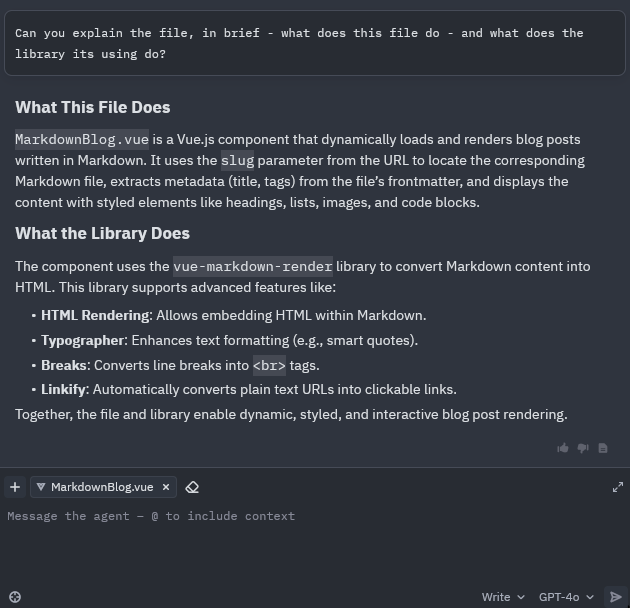
Zed's AI agent in action, helping with an explanation.
Choosing the Right Model: Claude vs OpenAI
Zed supports integration with several models, and one of the first decisions I faced was which model to use for the agent itself. After some experimenting and research, here’s a quick comparison from my perspective:
OpenAI (GPT-4-turbo)
Pros:
- Strong code reasoning ability
- Excellent Markdown, HTML, and CSS understanding
- Handles multi-step reasoning (like “refactor this and add dark mode support”) well
Cons:
- Sometimes too verbose or “clever” in implementation
- Requires an API key (not free for heavy usage)
Claude (Anthropic, Claude 3 family)
Pros:
- Very readable and minimalistic code suggestions
- Great with incremental refactors
- Lightweight tone; feels more like a collaborator
Cons:
- Slightly less effective at deeply nested changes
- Documentation-based tasks (like complex Webpack configs) can be hit-or-miss
Ultimately, I switched between the two. I used GPT-4 for heavy lifting (e.g., "make this production-ready") and Claude when I wanted tighter, more human-like iteration ("what if we just added a sidebar here?").
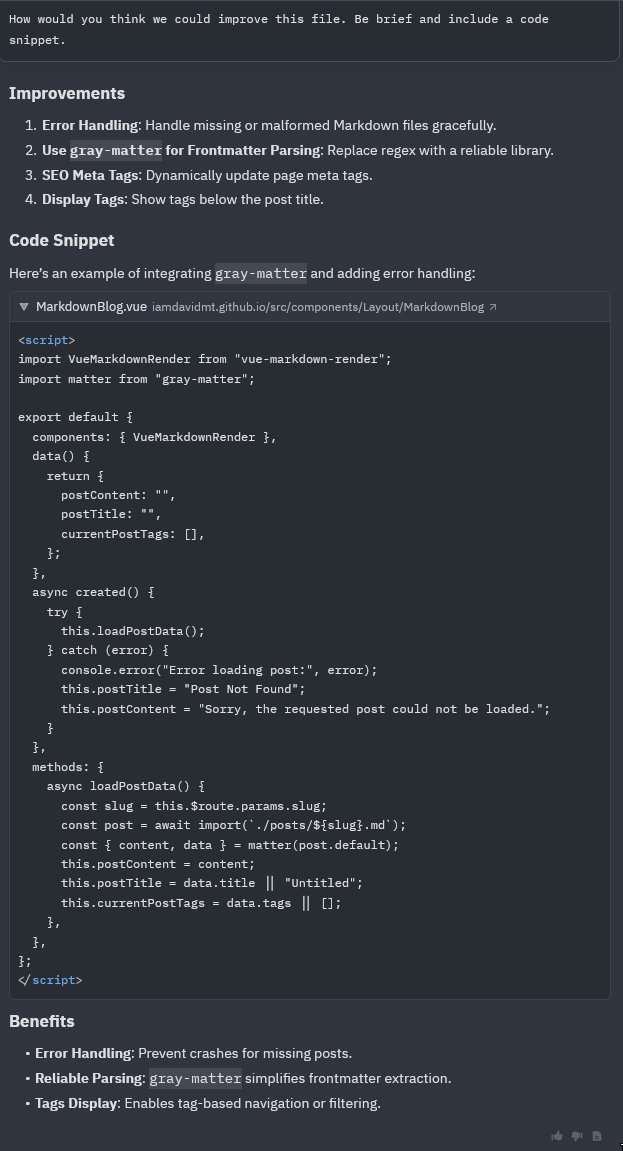
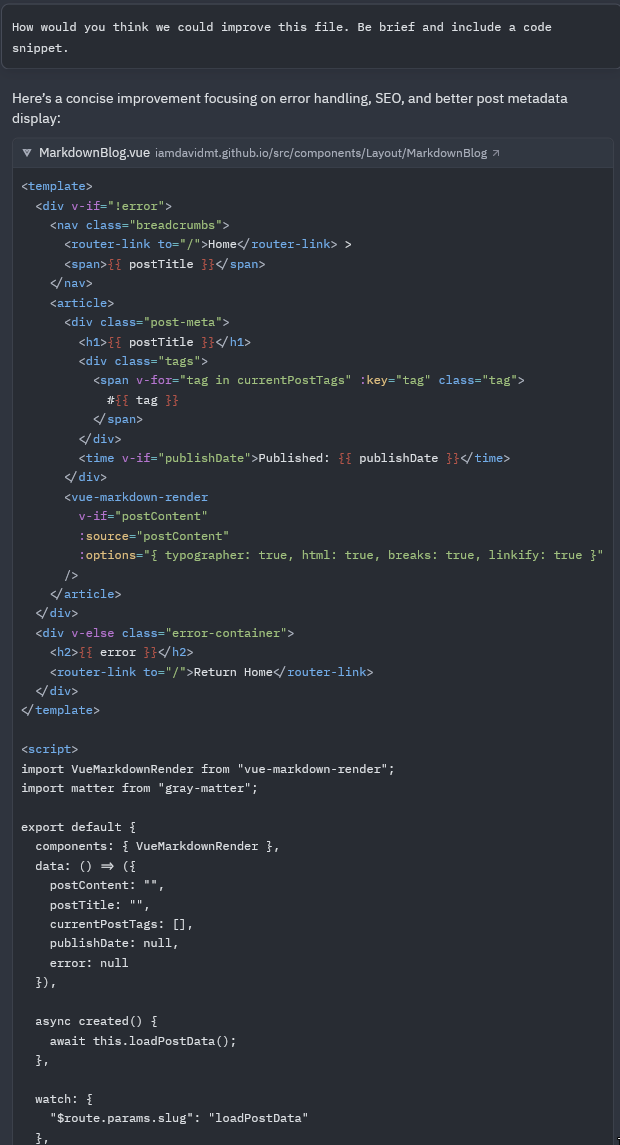
Different responses from the chatgpt 4o (left) and claude 3.5 (right) models
My Workflow: Code, Test, Ask, Iterate
Let me walk you through the process of building the blog feature using the AI agent in Zed.
Step 1: Bootstrap With What I Knew
I started the way I usually do — manually. I dug into Markdown libraries that could work with Vue2. I chose vue-markdown-render for its simplicity and compatibility, essentially just a wrapper around markdown-it.
After getting the basic functionality working (loading a .md file, parsing it, and injecting the result into the DOM), I had something like:
import VueMarkdownRender from "vue-markdown-render";


export default {
  data() {
    return {
      content: ''
    };
  },
  async mounted() {
    const post = await import(`./posts/${slug}.md`);
  }
};
This worked. But it looked terrible, lacked code highlighting, and didn’t account for Vue’s reactivity quirks or performance considerations.
Step 2: Ask the Agent to Improve It
I opened Zed and asked my AI agent:
“Refactor this to support syntax highlighting and make sure it’s safe to use with v-html in Vue2.”
In seconds, I had suggestions involving highlight.js, sanitization options, and a better way to manage content loading. I dropped the code in and tweaked it, then followed up with more:
“Add error handling.” “Can you lazy load the markdown file only when the component is visible?” “Make this mobile-friendly.”
Each time, the agent refined the code, keeping the context of my stack in mind.
The Real Value: Time Saved and Sanity Preserved
In the past, this kind of iterative development — especially in a tech stack that feels frozen in time—would have taken hours of Googling, trial and error, and frustration. With the AI agent, it was more like having a very fast junior dev at my side: one who could suggest, explain, and tweak things instantly. I didn’t always take its advice. Sometimes it went in strange directions, especially when I didn’t specify constraints clearly. But it always gave me a jumping-off point. One thing I had to be aware of was making sure that I committed often and didn't go down the spiral of insanity some of these LLMs love to take me down.
What Worked Well
- Markdown Rendering – Clean, readable, and customizable with syntax highlighting and plugins.
- Incremental Improvements – I could quickly ask the agent to handle small edge cases I forgot.
- Cost-Effectiveness – Since Zed is free and both Claude and OpenAI offer generous quotas, this approach was extremely budget-friendly.
What Could Be Better
- Context Length Limits – If you’re working in a big repo or file, sometimes the agent forgets what you told it five messages ago. You’ll need to copy/paste context occasionally.
- Not Always Vue2-Aware – At the start, the AI would sneak in Vue3 patterns. You have to review output carefully.
Final Thoughts
Adding a Markdown blog to my site turned from a potential day-long turned into a hour-long project. And the key difference wasn’t just the libraries; It was having an AI agent to iterate and experiment with in real-time.
If you’re working on a legacy tech stack, don’t assume AI tools are only for the newest frameworks or greenfield projects. They shine especially in cases like this—where you need to build something functional, fast, and without the luxury of a clean slate. I'd point you towards checking out Zed
Tips for Others Doing This
- Define constraints upfront – The clearer you are with your AI agent, the better.
- Use small steps – Don’t throw 200 lines of code at the model. Ask in chunks.
- Experiment with multiple models – Claude and OpenAI have different vibes. Pick the one that suits your style.
Conclusion
This experience has been a kind of time-travel: working with an old tech stack while using cutting-edge AI tooling. And the combination worked beautifully. So if you’re stuck with a legacy app and a stubborn desire to keep things simple—don’t ditch the stack. Augment it. Get an agent. And let them do the yak-shaving while you stay in the creative zone.